
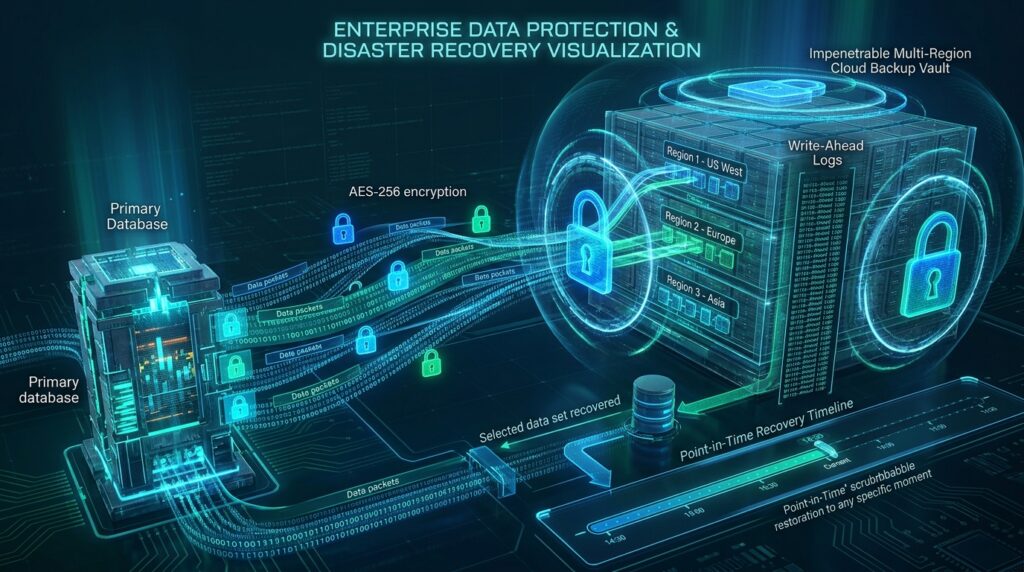
🛡️ Key Takeaways & Strategic Summary
- RTO and RPO Targets: Define explicit Recovery Time Objectives (how fast you recover) and Recovery Point Objectives (maximum acceptable data loss window).
- Client-Side Encryption (AES-256): Encrypt database dumps with GPG/AES-256 before streaming data across public cloud networks.
- Immutable Offsite Storage (WORM): Store backups in Write-Once-Read-Many (WORM) cloud object storage buckets immune to ransomware deletion.
- Automated Restore Drills: Automatically spin up ephemeral staging databases daily to verify backup archive integrity without human intervention.
In enterprise software operations, hardware failures, datacenter outages, and ransomware attempts are inevitable over a long enough timeline. At PixaQuant, we operate on the principle that an unverified backup is merely an unfulfilled wish. Establishing an automated, encrypted disaster recovery lifecycle guarantees business continuity and regulatory compliance.
1. Defining Your Business Continuity Metrics: RTO vs. RPO
Every disaster recovery strategy begins by defining two key operational parameters:
- Recovery Point Objective (RPO): The maximum acceptable age of files that must be recovered from backup storage for normal operations to resume (e.g., maximum 15 minutes of transactional data).
- Recovery Time Objective (RTO): The maximum acceptable duration of time that a system can remain down before full restoration (e.g., complete platform recovery in under 30 minutes).
2. Automated Encrypted Backup Pipeline (PostgreSQL & AWS S3)
In our production environments, backups are streamed directly into encryption pipes and uploaded offsite to multi-region cloud buckets:
#!/usr/bin/env bash
set -euo pipefail

TIMESTAMP=$(date +"%Y%m%d_%H%M%S")
BACKUP_NAME="pq_db_backup_${TIMESTAMP}.sql.gz.enc"

# Stream database dump -> compress -> encrypt -> upload to S3
pg_dump -U postgres -h 127.0.0.1 --clean --if-exists production_db \
  | gzip -9 \
  | openssl enc -aes-256-cbc -salt -pbkdf2 -pass "env:BACKUP_PASSPHRASE" \
  | aws s3 cp - "s3://pixaquant-secure-backups/daily/${BACKUP_NAME}" \
  --storage-class STANDARD_IA

echo "==> Encrypted backup streamed to offsite vault: ${BACKUP_NAME}"
3. Immutable Storage (WORM) Against Ransomware
Modern ransomware strains actively search for and purge attached backup drives. We configure S3 Object Lock in Compliance Mode, ensuring that uploaded backup objects cannot be deleted or overwritten by any user (including the AWS root account) for a mandatory retention period of 90 days.
4. Automated Synthetic Restoration Drills
To guarantee that backup archives are uncorrupted, our CI/CD systems run an automated restore drill every night:
- Pull the latest encrypted snapshot from offsite storage.
- Decrypt and decompress the payload inside an ephemeral Docker container.
- Execute database integrity checks (
SELECT count(*)across critical tables) and report verification success to our monitoring dashboard.
5. Frequently Asked Questions (FAQ)
How often should transactional SaaS databases be backed up?
We implement Continuous Write-Ahead Log (WAL) archiving paired with automated hourly incremental snapshots, achieving near-zero RPO (< 5 minutes).
Where should decryption keys be stored?
Decryption keys must never reside on the database server itself; they are managed in dedicated Hardware Security Modules (AWS KMS / HashiCorp Vault) with restricted IAM role access.
6. Protect Your Enterprise Data with PixaQuant
Don’t wait for a hardware catastrophe to discover your backups are corrupted. Explore PixaQuant’s Disaster Recovery & Cloud Infrastructure Services or contact our security team today.
4. Point-in-Time Recovery (PITR) with Write-Ahead Logging
Daily snapshot backups leave a dangerous 24-hour data vulnerability window. In our enterprise SaaS architectures, we implement continuous Write-Ahead Log (WAL) streaming (via pgBackRest / AWS Aurora Backups):
- Continuous Log Shipping: Every single database insert, update, and delete transaction is continuously streamed to offsite encrypted storage in near real-time.
- Microsecond Recovery Precision: In the event of an accidental database drop or data corruption at 14:32:15, engineers can restore the database to the exact state at 14:32:14 with zero data loss.
- Cross-Region Asynchronous Replicas: Maintain active read replicas in a geographically separate cloud region (e.g. Frankfurt and Dublin) for instant failover if an entire datacenter goes offline.
5. Disaster Recovery Runbook: 4 Steps to Full Infrastructure Rebuild
In the catastrophic scenario where an entire cloud provider region becomes unavailable, our team maintains automated Infrastructure-as-Code (Terraform) recovery runbooks:
- Step 1: Automated DNS Failover: Update Cloudflare DNS routing to point traffic to standby compute clusters in our secondary European datacenter.
- Step 2: Database Provisioning & Decryption: Pull the latest point-in-time encrypted snapshot from cross-region replica vaults and restore database tables.
- Step 3: Container Orchestration Launch: Launch application Docker container stacks using pre-built immutable image tags from GitHub Container Registry.
- Step 4: Automated Smoke Tests: Execute automated end-to-end API test suites to verify customer authentication, payment processing, and database read/write integrity before opening public access.