- 41.5% of all websites run on WordPress as of July 2026 (W3Techs), making content automation tools critical at scale.
- 74% of marketers say time savings is the top benefit of automation, which can cut campaign-management time by up to 80% (Market.us / Oracle, 2025–2026).
- Scheduling content updates in advance — with rollback and webhooks — removes the “remember to publish at 9 a.m.” problem for agencies and stores.
- Scheduled Content Updater, PixaQuant’s in-development WordPress plugin, handles scheduled field updates, rollback, templates, REST API/WP-CLI, and WooCommerce/ACF/Elementor/WPML. Preview the documentation →
WordPress powers 41.5% of all websites as of July 2026, according to W3Techs — a footprint so large that almost every agency and store eventually faces the same problem: content that needs to change at a specific moment. A flash sale that must end at midnight, a landing page hero that should swap on Monday, a price that updates across hundreds of products. Doing that by hand is fragile. Forgetting is expensive. This guide explains how scheduled content updates work in WordPress, why they matter, and how PixaQuant’s Scheduled Content Updater plugin approaches the problem.
Why Schedule WordPress Content Updates?
The case for automation is well documented. Market.us reports that 74% of marketers cite time savings as the most significant benefit of automation software, and analysis summarized by Rootstack puts the upper bound at an 80% reduction in time spent managing campaigns. Oracle’s automation data adds that 63% of teams implementing automation expect to see benefits within six months. None of that is specific to WordPress — but on a platform that runs 41.5% of the web, even a small per-task saving multiplies fast.
The deeper problem is reliability. A human has to remember to flip a setting at the right time, in the right timezone, on the right posts. Scheduled updates move that burden from a person’s calendar to the server’s cron. The change goes live whether or not anyone is at their desk.
Here is the detail most scheduling guides skip: WordPress already has built-in scheduled publishing for posts. What it does not have, in core, is scheduled field changes — updating a price, toggling a “featured” flag, changing a custom field, or swapping content blocks at a set time. That gap is what a dedicated scheduling plugin fills, and it’s where most real-world automation actually happens.
What Can Scheduled Content Updater Do?
Scheduled Content Updater (SCU) is built around six capabilities that cover the full lifecycle of a planned change.
- Scheduled updates — set a post, page, or product field to change at a specific date and time, automatically.
- Instant rollback — revert a change when a campaign ends, with no manual cleanup.
- Notifications & webhooks — get alerted (or trigger another system) when a task runs.
- Task templates — reuse a common change (for example, “set sale price”) across many items.
- Detailed logging — a full audit trail of what changed, when, and by which task.
- Calendar view — see every scheduled change in one visual timeline.
When we scoped SCU at PixaQuant, the requirement that shaped it most was rollback. A scheduled update that only goes forward is half a feature — every sale ends, every banner expires, every temporary notice comes down. Building rollback in from the start means a task is a complete loop: change it, then change it back, on a schedule you set once.
How Does a Scheduled Task Work?
The workflow is deliberately short. A task is four steps.
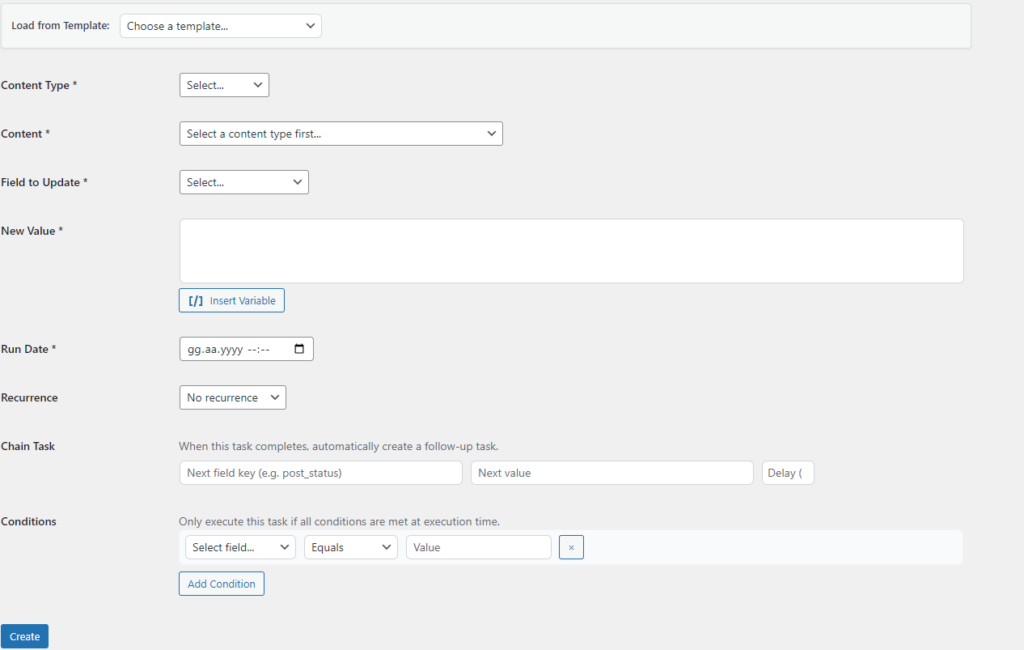
- Create a new task and choose the target content (a post, page, product, or custom type).
- Choose the field and the new value — a title, a price, a custom field, a status.
- Set the date and time the change should take effect.
- Save — the rest is automatic. WordPress’s cron fires the change at the scheduled moment, logs it, and (optionally) notifies you.
That same task can carry a rollback time, so the field returns to its original value without a second manual step.
What About Integrations and Developer Automation?
A scheduling plugin earns its place by fitting into the stack you already run. SCU integrates with the tools agencies and stores depend on: WooCommerce for product and price changes, Advanced Custom Fields (ACF) for custom field updates, Elementor for builder content, and WPML for multilingual fields.
For developers and automation-heavy teams, SCU exposes the same capabilities programmatically. A REST API and WP-CLI let external systems create and manage tasks, webhook events fire when tasks run, and a WP 6.9+ Abilities API integration even lets AI agents operate the plugin’s functions when the host site supports it.
SCU is currently in development and not yet on the market. We’re sharing the feature set now so agencies, store owners, and developers evaluating content-automation tooling can see the direction. The full reference — every capability, the Lite vs Pro breakdown, the REST API and WP-CLI details, webhook events, and an FAQ — lives in the Scheduled Content Updater documentation.
Who Is Scheduled Content Updater For?
The clearest fit is anyone who manages timed content at any volume. E-commerce stores running sales and flash promotions, agencies coordinating launches across client sites, publishers scheduling feature rotations, and SaaS teams toggling announcement bars all hit the same wall with manual editing. SCU turns those one-off, error-prone edits into reusable, logged, reversible tasks.
Frequently Asked Questions
Why aren’t my scheduled tasks running automatically?
WordPress relies on its cron system (WP-CRON) to trigger scheduled tasks. On low-traffic sites WP-CRON can fire late. The standard fix is to disable WP-CRON’s default behavior and trigger it from a real server cron job at a short interval, so tasks run on time.
How does rollback work?
When a task is created, the original value of the target field is stored. At the rollback time you set, SCU restores that original value automatically — no second task and no manual edit needed to undo a temporary change.
Can AI agents use the plugin?
On WordPress 6.9 and above, SCU registers capabilities through the Abilities API, so AI agents on hosts that support it can operate the plugin’s functions. On older versions, registration is skipped silently and the plugin works normally.
Conclusion: Stop Editing on a Timer
Scheduled content updates turn fragile, “don’t forget to change it at midnight” work into a reliable, logged, reversible process. On a platform that runs 41.5% of the web, that reliability compounds across every sale, launch, and campaign.
That’s the idea behind Scheduled Content Updater — a WordPress plugin that handles scheduled field changes, rollback, webhooks, templates, and developer automation in one place. It’s in active development, and the full documentation is the best place to see exactly how it works.